

Every Central European studio knows the frustration of missed deadlines when rendering jobs slow down unexpectedly. Consistent, high-performance computing is more than a wishlist item – it keeps your team productive and budgets on track. With dedicated cloud hosting, you gain exclusive access to powerful resources, eliminating the noisy neighbor problem and achieving predictable performance for even the most complex 3D projects. Discover how dedicated hosting delivers reliable speed, full control, and budget-friendly scalability for professional animation workflows.
Key Takeaways
| Point | Details |
|---|---|
| Dedicated Cloud Hosting | Provides exclusive server access, ensuring consistent performance and reliability for rendering tasks. |
| Tailored Server Configurations | Optimizing server types according to project needs can significantly enhance rendering times and workflow efficiency. |
| Improved Scalability | Studios can easily adjust server resources based on project requirements, avoiding performance bottlenecks and managing costs effectively. |
| Enhanced Support | Dedicated hosting offers superior technical support, helping studios resolve issues quickly and optimize their rendering pipelines. |
Dedicated Cloud Hosting: Core Concepts Explained
Dedicated cloud hosting means you get your own physical servers in the cloud – not shared with other customers. Think of it like renting an entire apartment versus sharing one with roommates. You have complete control, guaranteed performance, and nobody else competing for your resources.
This is fundamentally different from public cloud services where multiple companies share the same infrastructure. Single-tenant infrastructure eliminates resource contention, ensuring your 3D rendering jobs don’t slow down because someone else’s workload spiked.
With dedicated hosting, you avoid the “noisy neighbor” problem. Public clouds can’t guarantee when your render will actually run. Your job might wait hours if another customer’s heavy compute task is consuming the shared server.
Why this matters for 3D workflows:
- Predictable performance every single render cycle
- Full hardware configuration control to match your specific needs
- Guaranteed CPU and GPU availability when you schedule renders
- Better security isolation for proprietary project files
- Compliance benefits if working with regulated industries
You’re not fighting for resources. Your rendering studio gets consistent, dependable compute power. That means faster turnarounds on animation deadlines and fewer retry scenarios when performance dips unexpectedly.
MaxCloudON offers cloud compute configurations tailored specifically for 3D rendering, with options ranging from CPU-heavy setups to GPU-accelerated servers. Full root access means you install exactly what you need – Blender, 3ds Max, Cinema 4D, Maya, or any custom renderer your pipeline requires.
The trade-off is straightforward: dedicated hosting costs more than shared public cloud, but you pay only for consistent, guaranteed performance. No surprise slowdowns. No unpredictable pricing spikes based on demand.
Dedicated cloud hosting eliminates performance uncertainty – critical for studios managing tight rendering schedules and client deadlines.
Pro tip: Start with a single dedicated server for one complex project to experience the performance difference, then scale to a full render farm once your team sees the consistency gains.
Types of Dedicated Cloud Servers for 3D Rendering
Not all dedicated cloud servers are created equal. Your choice depends on what you’re rendering – a still frame architectural visualization needs different hardware than a 4K animation sequence. Understanding your options ensures you pick the right configuration and control costs.
GPU-Accelerated Servers dominate 3D rendering workflows. These pack NVIDIA or AMD graphics cards alongside powerful CPUs. GPUs handle the parallel processing that rendering engines love. Most modern renderers – Cycles in Blender, Arnold, V-Ray – benefit massively from GPU acceleration. You get renders finished in hours instead of days.
CPU-Only Servers still matter for specific tasks. Some studios use CPU rendering for final quality outputs where GPU limitations don’t apply. Octane, RenderMan, and certain specialized renderers prefer CPU computation. CPU servers also handle preprocessing, asset management, and simulations that don’t need GPU power.

Hybrid Configurations combine both. You run simulations and prep work on CPUs while GPUs handle the actual frame rendering. This splits workload intelligently and maximizes hardware utilization across your entire pipeline.
MaxCloudON offers 7 essential types of GPU servers for 3D rendering, each configured for different project scales and complexity levels. Whether you’re a solo freelancer or a full animation studio, there’s a server type matching your render requirements.
Key differences between server types:
Here’s a quick comparison of dedicated server types for 3D rendering projects:
| Server Type | Best For | Hardware Focus | Workflow Impact |
|---|---|---|---|
| GPU-Accelerated | Animation sequences | High-performance GPUs | Renders finish much faster |
| CPU-Only | Still images | Powerful CPUs | Quality, flexible tasks |
| Hybrid | Mixed projects | CPUs and GPUs | Efficient, balanced use |
| High-Memory | Complex scenes | Expanded RAM | Handles large files easily |
| Multi-GPU | Heavy workloads | Multiple GPUs | Fastest possible output |
- GPU servers: Fast frame rendering, high upfront cost, ideal for animations
- CPU servers: Flexible rendering options, slower output, better for still frames
- Hybrid setup: Balanced workflow, maximum efficiency, higher infrastructure complexity
- High-memory servers: Essential for massive scenes with complex geometry and textures
- Multi-GPU servers: Multiple graphics cards sharing work, fastest possible renders
Your Central European studio likely manages multiple project types simultaneously. A hybrid approach lets you optimize spending – allocate expensive GPU servers only when rendering, use cheaper CPU instances for everything else.
Matching server type to your rendering engine and project type directly impacts both speed and budget efficiency.
Pro tip: Test your actual project files on different server types using MaxCloudON’s flexible deployment – measure render times and costs before committing your full pipeline to one configuration.
How Dedicated Cloud Hosting Empowers Studios
Dedicated cloud hosting transforms how animation studios operate. Instead of managing physical servers or fighting public cloud resource contention, your team focuses entirely on creative work. The infrastructure handles itself.
Guaranteed Compute Resources sit at the core. You book specific CPU and GPU capacity – it’s always available when you need it. No queue delays. No performance surprises mid-project. Isolated, high-performance computing resources accelerate rendering times dramatically, directly impacting your studio’s output capacity.
When you’re managing multiple client projects simultaneously, predictability becomes survival. One studio might finish a 4K animation render in 36 hours on shared cloud infrastructure, but with dedicated servers, that same job completes in 12 hours. The difference compounds across dozens of frames and projects.
Scalability without complexity is another game-changer. Projects demand fluctuating resources. Concept renders need minimal power. Final exports need everything you can throw at them. Dedicated cloud hosting lets you spin up additional servers instantly when projects heat up, then scale back when they cool down. You pay only for what you use, month to month.
Studio collaboration improves dramatically with dedicated infrastructure. Your entire team accesses the same render farm with consistent performance. Remote artists in Prague, Vienna, or Budapest work seamlessly alongside on-site staff. File transfers happen faster. Render times stay predictable. Nobody waits around wondering why their job is slow.
Benefits for your studio include:
This table summarizes the strategic benefits of dedicated hosting for animation studios:
| Benefit | Business Result | Workflow Improvement |
|---|---|---|
| Guaranteed resources | Finish projects faster | Eliminates performance delays |
| Customizable infrastructure | Seamless integration | Run any software needed |
| Enhanced collaboration | Team productivity | Consistent remote access |
| Predictable costs | Easier budgeting | Avoids surprise expenses |
| Superior security | Protects client assets | Simplifies compliance |
- Faster render completion times reducing project timelines
- Consistent performance enabling accurate deadline predictions
- Full hardware and software control for custom pipeline integration
- Enhanced security for proprietary projects and client work
- Simplified team collaboration across multiple locations
- Cost predictability with transparent, flexible pricing
Customized infrastructure means you configure exactly what your pipeline needs. Installing Blender, 3ds Max, custom scripts, and proprietary tools becomes straightforward. You have root access – complete control.
Dedicated cloud hosting removes infrastructure headaches, letting your studio concentrate on what matters: creating exceptional 3D work.
Pro tip: Start by migrating your most time-sensitive project to dedicated hosting first – document the render time improvements and cost savings, then use those numbers to justify expanding dedicated capacity across your entire studio.
Comparing Dedicated and Shared Hosting Solutions
Choosing between dedicated and shared hosting fundamentally shapes your studio’s performance and costs. Understanding the differences prevents expensive mistakes down the road.
Shared hosting packs multiple studios onto single servers. You share CPU, GPU, memory, and bandwidth with competitors. When another studio launches a massive render job, your performance drops. Your frames slow down. Deadlines slip. This “noisy neighbor” problem plagues shared environments constantly.
Shared hosting costs less upfront – perfect for startups with minimal budgets. But that savings disappears when render times triple and you miss client deadlines. The math fails fast for professional studios handling production work.
Dedicated hosting gives you exclusive server access. Your CPU cycles belong only to you. GPU memory is yours alone. Physical server isolation prevents performance degradation caused by other tenants sharing your infrastructure.
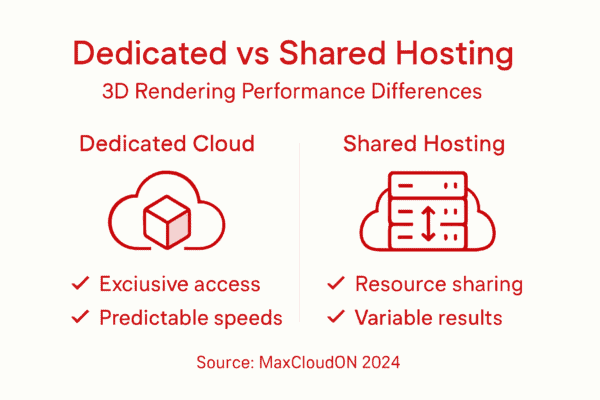
Performance becomes predictable. You schedule a 48-hour render farm job knowing it finishes in 48 hours – not 72 hours when shared resources get congested. That reliability is worth exponentially more than the cost difference.
Key differences:
- Performance: Dedicated delivers consistent speed; shared varies wildly
- Cost: Shared is cheaper initially; dedicated costs more but saves time
- Control: Dedicated allows full configuration; shared offers limited options
- Security: Dedicated isolates your projects; shared risks data exposure
- Scalability: Dedicated lets you add resources instantly; shared depends on provider capacity
- Reliability: Dedicated guarantees availability; shared depends on neighbor activity
Central European studios managing client work need dedicated cloud solutions for mission-critical renders. Predictable, stable performance through physical isolation ensures you deliver quality work on deadline.
Shared hosting works fine for learning 3D software or personal hobby projects. Professional animation production demands dedicated infrastructure.
For studios handling client work and tight deadlines, dedicated hosting isn’t optional – it’s essential business infrastructure.
Pro tip: Calculate your average monthly render time, multiply by your team’s hourly rate, then compare that cost against dedicated hosting fees – you’ll typically discover dedicated hosting actually saves money through faster completion times.
Financial, Security, and Support Implications
Dedicated cloud hosting requires upfront investment, but the financial picture becomes clearer when you factor in performance gains and operational reliability. Yes, monthly costs run higher than shared hosting. That’s the trade-off.
But here’s the reality: faster renders mean faster project completion. A studio completing animations 40% quicker effectively multiplies output without hiring additional staff. Over twelve months, that efficiency advantage typically justifies the higher hosting fees.
Cost predictability matters enormously for budget planning. Dedicated hosting uses transparent, fixed monthly pricing. You know exactly what infrastructure costs next month. Shared hosting introduces surprise expenses when performance degrades and you need emergency upgrades mid-project.
Security becomes non-negotiable when handling client work. Physical isolation reduces attack surfaces and compliance risks significantly. Your proprietary animations, client assets, and trade secrets stay isolated from other companies’ data.
When working with advertising agencies, film studios, or corporate clients, data protection requirements are strict. Dedicated hosting simplifies compliance with industry standards. Shared infrastructure creates liability headaches you simply don’t need.
Support quality differs dramatically between dedicated and shared hosting. MaxCloudON offers personalized support tailored to your specific workflows. Not automated chatbots. Real technical experts who understand 3D rendering pipelines.
Benefits for your studio:
- Dedicated support engineers familiar with your setup
- Rapid incident response when issues emerge
- Proactive monitoring preventing problems before they impact renders
- Technical guidance on optimizing your pipeline
- Faster ticket resolution versus generic shared hosting support
Dedicated environments receive enhanced support with tailored SLAs and quicker access to expertise. When your studio faces a critical rendering deadline, that quality support becomes invaluable.
Shared hosting support handles thousands of customers with generic solutions. Dedicated hosting support knows your infrastructure intimately.
Premium support, security isolation, and cost predictability combine to create infrastructure that actually reduces total business risk despite higher hosting fees.
Pro tip: Request a detailed cost-benefit analysis from MaxCloudON comparing your current infrastructure expenses against dedicated hosting fees, including time savings from faster renders – most studios discover they break even within six months.
Unlock Consistent Power for Your Demanding 3D Workloads
The article highlights common challenges like unpredictable render times, noisy neighbor effects, and limited control over your infrastructure that can slow down your studio’s creativity. If you are searching for dedicated cloud hosting that guarantees exclusive access to CPU and GPU resources with full customization, MaxCloudON is designed exactly for studios with high-performance rendering needs. Avoid delays and enjoy secure, scalable servers optimized for complex 3D projects including animations, stills, and simulations.
MaxCloudON offers immediate deployment of dedicated servers and customizable cloud compute servers tailored to your specific workloads. You also get access to RenderSonic, an automated cloud rendering software that streamline your 3D production workflow – allowing your team to upload projects from Blender, Maya, 3ds Max, and more with upfront cost estimates and zero infrastructure hassle. Discover how full control over your dedicated environment empowers your studio to meet tight deadlines, protect valuable assets, and scale seamlessly.
Experience the difference today starting with a single dedicated server and scale as your projects grow at MaxCloudON.
Boost your studio’s productivity and never wait for your renders again.
Visit MaxCloudON now to set up your dedicated cloud environment and take control of your demanding 3D rendering workloads instantly.