
Cinema 4D vs Blender is a question almost every 3D artist faces. While both tools can deliver high-quality results, they differ significantly in workflow, learning curve, motion graphics, and rendering philosophy. This article compares Cinema 4D vs Blender in depth to help you choose the right tool for your goals.
When I first stepped into the world of 3D design, I was overwhelmed by the sheer number of 3D software options available. The question of Cinema 4D vs Blender quickly became unavoidable. Every forum, every tutorial, and every professional I spoke to, seemed to have a strong opinion on which 3D software is the best. I wasn’t just looking for a tool; I was looking for software that could grow with me, support real projects, and not drain my budget before I even got started. This wasn’t just a technical decision – it felt career-defining. I knew whichever software I chose would shape how I learned, how I worked, and how I presented myself in the industry.
At the time, I had limited knowledge of professional 3D workflows. I had experimented with other tools, but nothing serious enough to call myself proficient. I needed software that could handle animation, complex models, rendering, and texturing. That’s when I decided to put both Cinema 4D and Blender head-to-head in my own workflow. What I discovered was not just a feature comparison, but two very different philosophies of design software.
How to Choose Your First 3D Design Software
Choosing your first 3D design software isn’t as simple as picking the one with the most features. You need to carefully weigh several factors that directly affect your learning speed, workflow efficiency and long-term growth.
Cost and Accessibility
Cost is an unavoidable factor. Cinema 4D comes with a significant price tag, while Blender’s open source nature allows anyone to start for free. For beginners or independent artists, that difference alone can determine whether you even begin. However, cost alone doesn’t make the final decision.
Learning Curve and Community Support
The learning curve is just as important. If the software feels too complex early on, you’ll lose motivation quickly. You need strong tutorials, a supportive community, and an interface that doesn’t feel overwhelming.
Blender offers a massive community with countless free tutorials and resources. Cinema 4D, on the other hand, is widely known for being more intuitive – especially for motion graphics.
This raises and important question: Do you prefer the technically deep, node-based workflow of Blender, or the smoother entry point of Cinema 4D?
Industry Relevance and Professional Use
I wasn’t learning just for fun – my goal was professional work. Cinema 4D has long been considered an industry standard for motion graphics, while Blender has gained serious traction in recent years thanks to major improvements and a rapidly growing community. Whichever software I chose, it needed to integrate seamlessly with other tools, support smooth imports and exports, and fit naturally into real production pipelines used by studios and freelancers alike.
Cinema 4D vs Blender: Core Comparison
When I compare the two side by side, the differences become clear almost immediately. Cinema 4D feels polished and guided. The interface encourages progress without overwhelming you. The Cinema MoGraph System makes motion graphics intuitive and fast – you can easily create animations and preview camera movements in real time. Blender, on the other hand, stands out for its flexibility. The Blender Node System and Cycles path-tracing engine offer a powerful procedural workflow – but with a noticeably steeper learning curve.
In terms of modeling, Blender’s sculpting tools and polygonal modeling capabilities provide exceptional control and precision over complex assets. Cinema 4D is strong in modeling as well, but Blender’s open source nature and extensive add-ons allow more freedom to experiment.
Texturing reveals a similar contrast: Cinema 4D offers a more intuitive texturing workflow, while Blender’s node-based approach requires more patience – but rewards you with deeper control over materials and shaders.
Ultimately, the choise isn’t about which software is better, but which one aligns with your goals, workflow, and budget. Both have strengths and limitations, and both continue to shape the way I approach 3D design in different ways.
Availability and Accessibility
When evaluating Cinema 4D vs Blender, availability becomes one of the most noticeable differences. Cinema 4D requires a paid license, and while a trial is available, the cost remains a recurring factor for ongoing projects. For someone, who is still experimenting and learning, this is a serious commitment that has to be considered carefully. Blender, by contrast, stands out because of its open source nature. It can be downloaded instantly, installed on multiple machines, and used without subscriptions or license restrictions. That freedom encourages experimentation without the pressure of wasting money if something doesn’t work out.
Availability also affects how easily the software fits into a real workflow. With Blender, importing raw footage, testing different animation tools, and exporting models for use in other software feels flexible and straightforward. Cinema 4D supports these workflows as well, but Blender’s ability to handle a wide range of file formats has improved significantly in recent years. This makes collaboration easier, especially when working with people who use different tools.
In terms of accessibility, Blender’s availability extends beyond just cost. Blender’s community provides constant support through tutorials, add-ons, and problem-solving discussions. Cinema 4D offers strong professional support too, but much of it is tied to paid resources or formal training programs.
Availability, in the end, isn’t only about downloading software – it’s about having ongoing access to learning materials, community knowledge, and support systems that ease you to use the software effectively in real-world projects.
Learning Curve
Once I had both programs installed, the next challenge was the learning curve. Cinema 4D’s user interface feels clean and approachable. You can easily navigate menus, adjust view camera movements, and set up simple animation sequences without feeling lost. The software is designed to be intuitive, which helps maintain motivation in the early stages. It’s easy to see why many professionals consider it an industry standard for motion graphics – it keeps the focus on creativity instead of technical hurdles.
Blender, however, takes a different approach. Its node-based system requires more technical thinking. At first, this can be frustrating. I had to spend hours watching tutorials and experimenting with materials just to understand how the procedural workflow functions. But over time, I realized that this complexity provides much more control. For example, when working with the Cycles path-tracing engine, lighting and rendering can be fine-tuned in ways that aren’t as accessible in Cinema 4D. The process is slower, but the results are often more detailed and realistic.
Another key difference lies in sculpting tools and polygonal modeling. Blender demands more patience, but it rewarded me with the ability to create complex models that felt highly customizable. Cinema 4D, while easier to learn, sometimes can feel limiting when pushing boundaries. I found myself torn between the simplicity of Cinema 4D and the depth of Blender. From my experience I realized that the key differences in the learning curve came down to this: Cinema 4D is faster to pick up, but Blender builds a deeper foundation of knowledge over time.
Looking back, I can say that the learning curve is not just about how quickly you can start a project, but about how much you could grow as a designer. Cinema 4D gave me confidence early on, but Blender challenged me to think differently and made me a stronger 3D artist.
Interface
The interface highlights a clear philosophical difference between the two softwares – Cinema 4D vs Blender. Cinema 4D’s layout feels polished, predictable, and easy to navigate. Tools are easy to find, camera movements are straightforward, and animation setups don’t feel overwhelming – a major advantage for beginners and production environments where speed matters.
Blender’s interface is more demanding. Its node-based workflows offer far more flexibility and technical depth but require patience and practice. Over time, however, this complexity provides deeper control over rendering, textures, and animation tools.
Another key difference is how each interface handles add-ons and customization. Blender’s open design allows me to install add-ons that significantly improve my workflow. I can adapt the interface to match my needs – something Cinema 4D doesn’t offer as freely. This flexibility means that while Blender’s interface is harder to learn, it eventually becomes more powerful for specific, customized workflows. Cinema 4D, on the other hand, is more rigid but also more predictable, which makes it easier to use in professional environments where consistency and stability are essential.
I realized that the key differences in interface come down to this: Cinema 4D prioritizes ease of use, while Blender prioritizes flexibility and customization. Both approaches have value, but they clearly cater to different types of users – those who want speed and simplicity versus those who prefer deep control and a more customizable workflow.
Motion Graphics
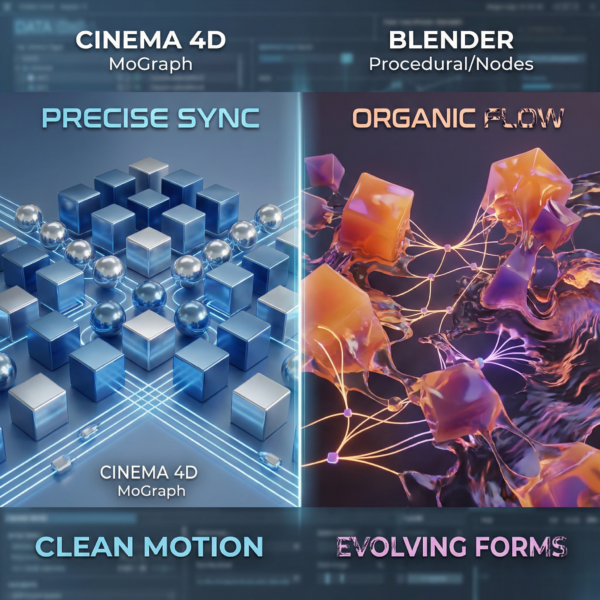
When it comes to motion graphics, the difference between Cinema 4D vs Blender becomes especially noticeable. Cinema 4D has long been considered the industry standard for motion design, and I once I started working with it, I understood why. Its MoGraph System is superior for creating dynamic animations. You can easily clone objects, apply effectors, build dynamic setups, and preview camera movements in real time. The workflow feels fast, intuitive, and built specifically for motion designers. I could create complex animations without diving into overly technical setups, which kept my projects smooth and efficient.
Blender approaches motion graphics from a different angle. Its animation tools are powerful, but they require more manual setup and a deeper understanding of procedural workflows. I often had to rely on Blender Node System and various modifiers to achieve effects that Cinema 4D handled directly. While this slowed the process down, it also gave me more flexibility and control. When I combined Blender’s procedural workflow with the Cycles path-tracing engine, I could create highly realistic motion graphics that felt unique compared to Cinema 4D’s clean, polished style.
Integration also plays a role. Cinema 4D makes it easy to import raw footage and composite animations directly within the software. Blender can do this too, but the workflow feels less streamlined. Still, Blender’s add-ons and strong community support often filled the gaps and provided creative solutions.
Looking back, I can say that the key differences in motion graphics came down to priorities:
- If you need speed, reliability, and an industry-proven toolset, Cinema 4D is the stronger choice.
- If you want flexibility, customization, and the ability to experiment beyond traditional motion design, Blender gives you that freedom.
Modeling
Modeling is one of the areas where the differences between Cinema 4D vs Blender become most visible. Cinema 4D offers a straightforward workflow for polygonal modeling. Creating basic shapes, refining geometry, and building production-ready assets feels fast and intuitive. It’s excellent for clean, structured geometry and tasks where precision and speed matter. However, when I wanted to push into more complex or highly detailed models, I sometimes felt limited by the sculpting and deformation tools available. Cinema 4D is reliable for straightforward modeling, but it doesn’t provide the same depth of sculpting control or experimental flexibility that Blender offers.
Blender excels in this space. Its sculpting tools, procedural modifiers, and non-destructive workflow give me far more freedom to explore intricate shapes and refine models in ways that simply aren’t as accessible in Cinema 4D. Whether I’m sculpting organic forms or building complex assets, Blender’s toolset encourages experimentation and deeper control.
In the end, Cinema 4D is faster and more streamlined for simple modeling tasks, while Blender becomes the stronger choice for advanced, high-detail, or experimental modeling workflows.
Texturing
Speaking about texturing Cinema 4D offers a more intuitive texturing process – you can easily apply materials and see results quickly. You can drag and drop textures, adjust parameters, and achieve a polished look without much effort. This intuitive texturing workflow is ideal for projects where speed matters more than technical depth.
Blender, however, relies heavily on its node-based system. At first, this can feel intimidating. I have to connect nodes, adjust shaders, and experiment with Blender Node System to achieve the look I want. But once I become comfortable with it, the power of this approach becomes clear. Combined with the Cycles path-tracing engine, Blender allows me to create realistic textures and lighting setups that Cinema 4D cannot match as easily. The process is slower, but the results are often worth the extra effort.
Rendering
Rendering is one of the most decisive factors in the Cinema 4D vs Blender comparison. Cinema 4D offers reliable rendering features that integrate smoothly into its overall workflow. You can set up a project, adjust lighting, and render animations without worrying about crashes or inconsistencies. The experience feels stable and professional, which makes Cinema 4D well suited for client work and production deadlines.
Blender’s Cycles path-tracing engine delivers more realistic results because of the way it handles light, shadows, and reflections – a core part of 3D rendering that becomes increasingly important as scenes grow more complex.
Blender’s Cycles path-tracing engine, however, delivers results that often feel more realistic. The way it handles light, shadows, and reflections is impressive. While it requires more computing power and patience, the quality of the final render is frequently superior. Over time, I find myself using Blender for projects where realism matters most, while relying on Cinema 4D for faster turnarounds and predictable delivery.
When render times start becoming a bottleneck – especially with high-resolution scenes or complex lighting – offloading final frames to a render farm becomes a practical solution. For Blender and Cinema 4D projects, I rely on MaxCloudON cloud render farm to scale rendering power on demand without changing my workflow.
For Blender users who prefer a fully hands-off approach, RenderSonic offers an automated rendering workflow that handles job submission and processing without manual configuration.
Workflow and Project Integration
One of the biggest challenges I faced was integrating these programs into my overall workflow. Cinema 4D makes it easy to import raw footage, composite animations, and export models for use in other software. It is clearly built with professional prodiction pipelines in mind, which makes it reliable for collaborative projects and client-driven work.
Blender, thanks to Its open source nature, offers far more flexibility. You can customize your workflow with add-ons, experiment with different file formats, and adapt the software to fit specific project needs. The Blender community plays a huge role here, constantly providing plugins, scripts and solutions that fill workflow gaps.
While Cinema 4D feels more predictable and structured, Blender gives me the freedom to experiment, customize, and evolve my pipeline over time. That balance between stability and flexibility is a major factor when choosing which tool to use for a specific project.
Cinema 4D vs Blender: Comparison Table
| Aspect | Cinema 4D | Blender |
|---|---|---|
| Pricing & License | Paid subscription with a higher entry cost | Completely free and open-source |
| Learning Curve | Easier to learn, beginner-friendly interface | Steeper learning curve, more technical |
| User Interface | Polished, predictable, and intuitive | Highly customizable but more complex |
| Motion Graphics | Industry standard with MoGraph system | Powerful but requires manual setup |
| Modeling Tools | Fast and clean for standard geometry | Advanced sculpting and polygonal modeling |
| Texturing Workflow | Simple, visual, and easy to use | Node-based system with deeper control |
| Rendering Capabilities | Stable, fast, production-ready | Cycles engine delivers high realism |
| Customization & Add-ons | More structured, fewer custom options | Extensive add-ons and community tools |
| Pipeline Integration | Built for professional studio workflows | Extremely flexible across pipelines |
| Community & Support | Professional support and paid training | Massive global community and free resources |
| Best Use Cases | Motion graphics, broadcast, fast turnaround projects | Realistic rendering, complex models, experimentation |
| Ideal For | Designers who value speed and simplicity | Artists who want control and flexibility |
Key Differences I Experienced
Looking back, the key differences between Cinema 4D vs Blender are clear. Cinema 4D excels in industry-standard motion graphics, offering a smoother user interface and a more intuitive texturing process, that suppoerts fast, predicatable final outputs. It feels designed to keep projects moving without friction.
Blender, on the other hand, offers freedom through its open source nature, powerful sculpting tools, and the ability to create complex models using a procedural, node-based workflow. While it requires more technical understanding, it rewards that effort with deeper control and flexibility.
Both programs have improved significantly in recent years, but they serve different needs. Cinema 4D prioritizes speed, consistency, and ease of use, while Blender emphasizes customization, realism, and creative freedom.
Conclusion
After years of working with both tools, it’s clear that neither Cinema 4D nor Blender is universally better. The right choice depends on the project requirements, workflow preferences, and long-term goals of the artist. Cinema 4D delivers speed, reliability, and an industry-proven system for motion graphics and client-focused work. Blender provides flexibility, depth, and the ability to experiment freely with complex models and realistic rendering. For me, Blender eventually became my primary tool because of its flexibility and the strength of its community. At the same time, I still rely on Cinema 4D whenever I need fast, polished results under tight deadlines.
In the end, the decision between Cinema 4D vs Blender isn’t about which software is better – it’s about which one is better for you. If you’re still exploring your options, you can also check out our full guide to the best 3D rendering software to see how other tools compare.
And if Blender is your tool of choice, browse our Blender tutorials and guides for deeper workflows, rendering tips, and performance optimization.
Sources:
- Maxon Cinema 4D Official
- Blender Official
- Blender Documentation
- Cinema 4D Documentation
- BlenderNation
- FX Guide
- Animation World Network
- VFX Voice
Frequently Asked Questions
Which software - Cinema 4D or Blender - is better for beginners?
Cinema 4D offers a smoother learning curve with an intuitive, beginner-friendly interface. Blender requires more patience and practice, but it helps you build deeper technical knowledge over time.
Can Blender compete with Cinema 4D in professional projects?
Yes. Thanks to Blender’s open source nature, powerful add-ons, and strong community support, it has become a fully capable tool for professional work in 3D modeling, animation, and even some motion graphics workflows.
Which software - Cinema 4D or Blender - is better for motion graphics?
Cinema 4D leads here - its MoGraph System is the industry standard. Blender can produce great motion graphics too, but it requires more manual setup and a deeper understanding of procedural workflows.
How do costs compare between Cinema 4D and Blender?
Cinema 4D requires a paid subscription or license, which can be expensive. Blender is completely free due to its open-source model, making it the most accessible option for beginners and independent artists.
Which software - Cinema 4D or Blender - is better for realistic rendering?
Blender’s Cycles path-tracing engine generally produces more realistic results, while Cinema 4D focuses on speed and workflow consistency.
Can I use both Cinema 4D and Blender together?
Yes. Many artists model in Blender and animate in Cinema 4D, or render in one and composite in another. Both support common file formats.