
When I first started working in 3D design, the debate was always the same: Blender vs 3ds Max. I had projects involving animation, rendering, and even architectural visualization, but I couldn’t afford to waste time learning the wrong software. I needed 3D software that fit my workflow and aligned with the industries I wanted to work in. So, I tested both Blender and 3ds Max on real projects. I compared their features, strengths, and limitations.
What I discovered is that both are powerful, but each has its own unique advantages. The right choice depends heavily on the type of project you are working on.
Background: Blender and 3ds Max
Before choosing between Blender and 3ds Max, it’s important to understand where they come from.
Blender is developed and maintained by the Blender Foundation. It’s entirely open-source, so I could download and use it for free – even on professional projects – without worrying about licensing costs. It runs on Windows, macOS, and Linux, and its huge community contributes to plugins, tutorials, and ongoing development.
3ds Max, on the other hand, is a commercial 3D application developed by Autodesk. It’s widely used in architecture, engineering and product visualization, but only available on Windows. It’s tightly integrated with other Autodesk products like AutoCAD and Revit.
As I explored both, I saw how differently they were built. Blender’s community-driven development made it flexible and constantly evolving. Meanwhile, 3ds Max had the backing of a major corporation – providing long-term stability, professional support, and seamless integration with other Autodesk software.
Both applications support animation, modeling, and rendering – but they approach these tasks differently. Blender is open, accessible, and versatile, while 3ds Max is specialized and optimized for high-end workflows.
Blender Features
Open-Source & Interface Flexibility
Blender is completely free and open-source – with no limitations, even for commercial projects. That freedom was a huge advantage when I started. You can work on professional-level projects without paying for expensive licenses. At first the interface felt overwhelming. But after customizing the layout and following a few tutorials, I quickly realized how efficient and powerful it could be – especially once I tuned it for my own workflow.
Modeling and Animation Tools
Blender’s modeling and animation features are impressively capable. I used them to create characters, environments and motion graphics – without needing extra plugins. Rigging and shape keys gave me precise control. I even created a full cinematic trailer using only Blender.
Visual Effects and Simulation
Blender also impressed me with its built-in tools for visual effects and dynamic simulations. I can simulate smoke, fire, fluids, particles and cloth – all inside Blender, without the need for third-party plugins. These capabilities let me deliver realistic VFX shots that looked great straight out of Blender.
Combined with Blender’s flexible shader and materials system, I was able to create detailed textures and surfaces. The results were consistently convincing – perfect for video game development and animation projects.
Sculpting & Modifiers
The sculpt mode is great for character work and organic forms. Blender’s modifier stack lets you build complex geometry non-destructively and iterate quickly. Blender’s modeling and sculpting tools are part of why I love it. For a deeper dive, check out Blender 3D Modeling: The Best Free 3D Modeling Software.
Blender Rendering & Cloud Support
Blender uses Cycles (path-traced) and EEVEE (real-time) as native render engines. For heavier scenes, I offloaded the rendering to MaxCloudON Blender render farm or used RenderSonic – a one-click fully automated rendering solution. If you want to understand how render farms work, check also What Is a Render Farm & How Does It Work?
File Format Support & Pipeline Integration
Blender supports formats like FBX, OBJ, Alembic, USD, and glTF. It integrates smoothly with Unity, Unreal Engine, and Substance tools.
Viewport Performance
Blender’s EEVEE viewport is highly responsive, even on mid-range GPUs – but if you want to pick the right hardware for your workflow, check out Your Guide to Nvidia Products. With optimized meshes and culling, real-time performance is solid for most projects.
Licensing & Commercial Use
Blender is licensed under the GNU GPL, making it completely free – including for commercial use. You can sell your creative work without restrictions and license fees.
Community & Learning Resources
Blender has one of the largest and most active communities in the 3D world. Countless tutorials, add-ons, forums, and free resources are available online.
3ds Max Features
Industry Recognition
When I moved into professional environments, I quickly realized how widely adopted 3ds Max was. In architecture and interior design, final outputs often had to be in 3ds Max format. It’s considered the gold standard in AEC (Architecture, Engineering, Construction) industries.
While Blender enjoys strong community support, 3ds Max benefits from the credibility and enterprise backing of Autodesk, which gives clients confidence in both the workflow and the final renders.
Modeling & Materials
3ds Max excelled in precision modeling, especially for architectural and interior design work. In a particular project, I simulated daylight behavior on interior surfaces – and the level of detail I was able to achieve was unmatched. Its extensive material library, along with support for top rendering engines like V-Ray, Arnold, and Corona, allowed me to deliver stunning photorealistic results. Even large-scale scenes were handled smoothly and efficiently.
Animation & Scene Management
Although 3ds Max is primarily associated with architecture designs, I used it for animation projects too. Its built-in Biped system and CAT tools made rigging faster and more manageable, while scene layers and instancing helped me organize and optimize complex files. While it isn’t as flexible as Blender for visual effects or dynamic simulations, I still can deliver high-quality animation for structured environments like architectural walkthroughs or product visualizations.
Interface & Workflow
The 3ds Max interface felt more traditional – and at first, just as overwhelming as Blender. But once I adapted, it proved to be predictable and straightforward. That consistency made it ideal for large, collaborative projects, where precision and industry standards matter. It felt stable and studio-friendly – a clear reflection of its design for professional environments, especially in architecture and engineering workflows.
Rendering & Performance
To speed up my architectural renders, I used a MaxCloudON GPU server featuring an RTX 4090. That significantly reduced render times while preserving quality.
File Format Support & Pipeline Integration
3ds Max supports FBX, 3DS, DWG, and Revit files. It integrates tightly with AutoCAD, ReCap, Revit, and other Autodesk tools – a big advantage in building/engineering pipelines.
Viewport Performance
3ds Max handles heavy scenes well when optimized with proxies, layers, and instancing. On high-end virtual servers or cloud desktops, its viewport remains very responsive.
Licensing & Commercial Use
3ds Max is a paid subscription product. To use it professionally, you must follow Autodesk’s licensing terms and pricing.
Community & Learning Resources
3ds Max has strong professional support and learning platforms, as well as Autodesk’s official documentation. Free tutorials exist, but they are less than Blender’s.
Blender vs 3ds Max: Head-to-Head Comparison
After using both software applications heavily in real work, I’ve learned that choosing between Blender and 3ds Max isn’t about which is “better” – it’s about which fits your goals and workflow, and what kind of projects you’re tackling.
Industry Use
In my experience, Blender was a better fit for animation, VFX, game development and cinematic work. I used it to make trailers, motion graphics, particle effects, and creative 3D scenes.
3ds Max, on the other hand, dominated for architecture and interior design projects – especially when clients demanded precise light simulations, exact materials and photorealistic renders.
Both tools – Blender and 3ds Max – are highly capable, but each served different creative and technical needs. Blender stood out for creative and animation projects, while 3ds Max is stronger when handling large, technical scenes in architectural design.
Workflow and Efficiency
In terms of workflow, Blender gave me the flexibility to shape its interface and workflow to match my creative process. I could customize tools and speed up my pipeline.
3ds Max delivered a consistent, structured workflow – essential for team projects or architecture work where standards matter.
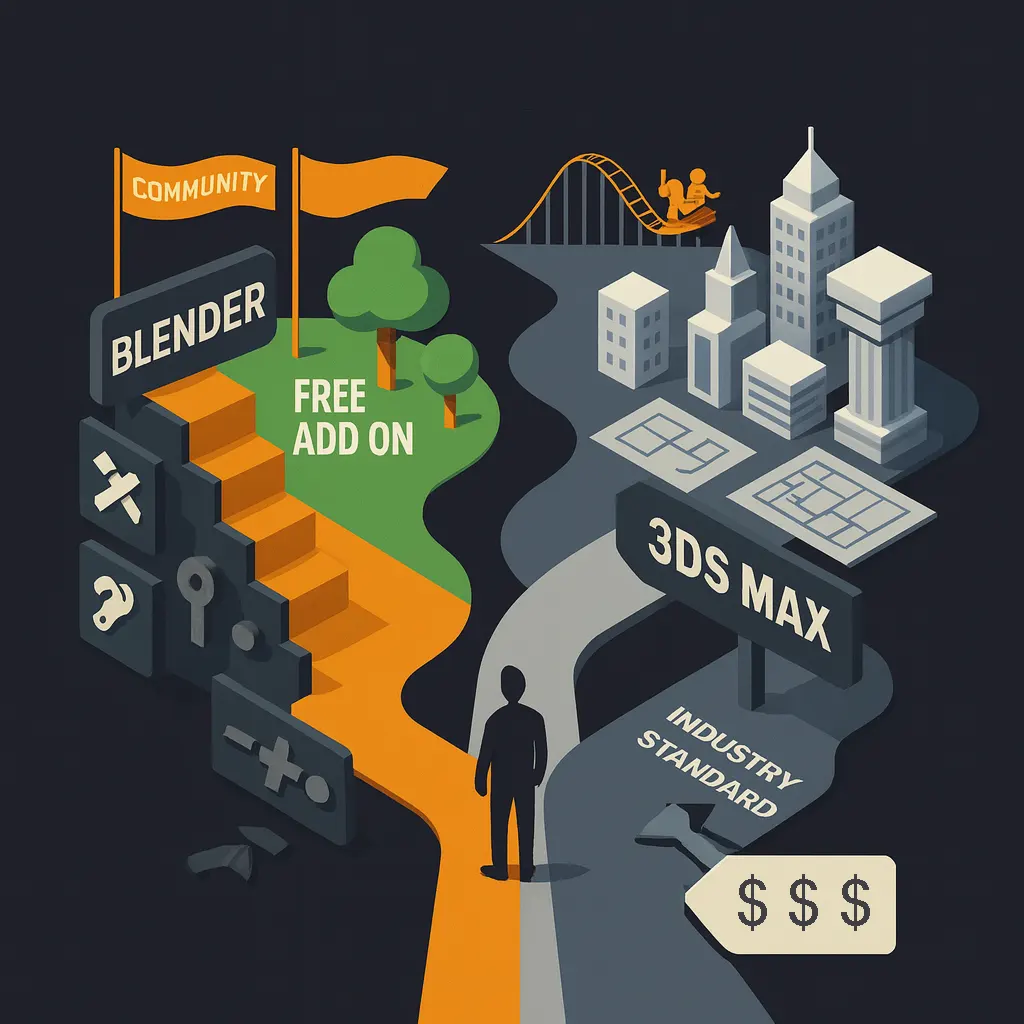
Flexibility vs Specialization
Blender felt like a toolbox – good at many things: sculpting, rigging, compositing, animation. Its open-source nature let me adapt it to almost any kind of project I threw at it.
3ds Max was less flexible, but highly focused. For architectures, interior renderings, and client-facing design work, it offered stability and reliability when it mattered most.
Beginners vs Professionals
For beginners, I’d recommend Blender – free, well-documented, and powerful enough to grow with you.
3ds Max took me longer to master, but once I did it, it became the right tool for professional, client-facing work – especially in the AEC (аrchitecture, engineering, and construction).
Comparison Table: Blender vs 3ds Max
After working extensively with both software applications, I created this side-by-side comparison of Blender vs 3ds Max to help choose the right software based on your project and workflow. For complex scenes, consider using a powerful GPU server – for instance, MaxCloudON’s GPU servers like the RTX 3090 from $47/day or RTX 4090 from $114/day – you can dramatically reduce your render times. View full GPU server pricing here to compare configurations and rates.
| Feature | Blender | 3ds Max |
|---|---|---|
| Price | Free, open-source | Paid subscription (Autodesk) |
| Best for | Animation, VFX, game development | Architecture, engineering, interior design |
| Rendering Engines | EEVEE (real-time), Cycles (path-tracing) | V-Ray, Arnold, Corona (plugins) |
| Sculpting Tools | Built-in, powerful sculpt mode | Basic sculpting; better with plugins |
| Modifiers & Non-Destructive Workflow | Extensive modifier stack | Modifier stack available, more CAD-like |
| Physics & Simulations | Fluids, smoke, fire, particles, cloth (built-in) | Supported but less flexible without plugins |
| Modeling Tools | Versatile for organic and hard-surface modeling | Excellent for architectural and parametric modeling |
| Animation Tools | Rigging, keyframes, shape keys, motion paths | Rigging, biped system, CAT, crowd animation |
| Plugins | Large free plugin/add-on base | Extensive pro-grade plugins (commercial) |
| OS Compatibility | Windows, macOS, Linux | Windows only |
| Ease of Use | Steep learning curve, highly customizable | Traditional interface, easier for AEC professionals |
| Community Support | Huge, open-source driven | Enterprise support, Autodesk plugins |
| Performance | Great on mid-range PCs | Requires stronger hardware for large projects |
| Cloud Rendering | Supported via MaxCloudON / RenderSonic | Supported via MaxCloudON GPU servers |
Real-World Case Study – Blender in VFX
In one of my most demanding creative projects, I used Blender to produce a cinematic trailer for an indie game. The client needed dynamic action shots, camera sweeps, explosions, and stylized effects – all on a tight deadline and limited budget. I used Blender’s built-in simulation tools for fire, smoke, and particles, along with Cycles for final rendering. The flexibility of the modifier stack and animation rigging allowed me to work fast and iterate without breaking the scene.
To speed up the final render, I used RenderSonic, MaxCloudON’s one-click automated Blender render farm. Uploading the project and launching the render took only minutes – and I received high-quality frames within hours.
Result: A professionally polished trailer delivered on time, with no expensive plugins or external software – all built in Blender and rendered in the cloud.
Real-World Case Study – 3ds Max in Architecture
For a large-scale commercial interior project, the client requested a daylight simulation across multiple lighting conditions – including early morning, noon, and golden hour. They also wanted fully staged rooms with materials, shadows, and reflections. I used 3ds Max along with V-Ray to simulate light behavior and material interaction. The material editor and render presets helped me maintain visual consistency across a large scene, which included high-poly furniture, glass partitions, and layered textures.
Because the scene was heavy, I rendered it using a MaxCloudON GPU server with an RTX 4090. This drastically reduced render time while allowing me to deliver crisp, high-resolution output for the client presentation.
Result: The client was able to make confident design decisions using lifelike visualizations – and I met the deadline with time to spare.
Conclusion
After testing both Blender and 3ds Max in real-world projects, I realized the right software isn’t about which one is “better” – but which one fits your goals and workflows.
Choose Blender if you’re focused on animation, VFX, or indie game development, and want freedom to experiment without paying for licenses.
Choose 3ds Max if you work in architecture, engineering, or interior design, and need precision modeling, industry-standard output, and deep plugin integration.
For rendering performance, both tools benefit from cloud infrastructure. When local hardware couldn’t cut it, I moved some work to the cloud – and the savings in time convinced me. See Advantages of Cloud Rendering to understand why many 3D artists switch. Try MaxCloudON GPU servers or RenderSonic to deliver faster results – without hardware bottlenecks.
Sources:
- Blender Official Website
- Blender.org Community
- Blender Artists Community
- Blender StackExchange
- Autodesk 3ds Max Official
- CGArchitect 3ds Max Forum
Frequently Asked Questions
Which is better for beginners: Blender or 3ds Max?
Blender is generally better for beginners thanks to its free access, active learning community, and built-in tools for modeling, animation, and visual effects. It's easier to explore without financial commitment. However, for architectural work, Blender can be harder to get studio-quality results without plugins. 3ds Max is better suited for architecture but has a steeper learning curve.
Which is better for architectural projects: Blender or 3ds Max?
3ds Max is preferred in professional architecture and engineering environments due to its precision, realism, and compatibility with industry tools.
Can Blender and 3ds Max be used together?
Yes. You can transfer assets between Blender and 3ds Max using formats like FBX, OBJ, and Alembic. However, custom modifiers, rigging systems, and materials may not always translate perfectly and could require adjustment.
Is Blender really free for commercial use?
Yes. Blender is licensed under the GNU GPL and is completely free - even for commercial projects, freelance work, and studio pipelines. You can use it to create and sell content without any licensing fees.
Does 3ds Max include everything needed for professional 3D work?
Not completely. While 3ds Max is powerful, most professionals rely on plugins like V-Ray, Forest Pack, or RailClone for advanced rendering, asset scattering, and architectural workflows.
What’s the best rendering option for Blender or 3ds Max?
For Blender, RenderSonic is an excellent automated render-farm solution - just upload your project and go. For both Blender and 3ds Max, MaxCloudON GPU servers offer full control and high performance for custom render workflows using engines like Cycles, V-Ray, Arnold, or Corona.